Monday, August 3, 2015

Create Progress bars in Dynamics AX [startlengthyoperation, SysOperationProgress,Animations]


This post is again useful for those developers who are new to X++ programming and would like to use progress bars or Hour glass indicators while some business logic is running, hinting the user that something is happening in the background.

Use a progress indicator during operations that take more than 2 seconds.

Use an hourglass mouse pointer if the process takes 2-7 seconds.

Use a progress bar if the process takes 8 seconds or more.

There are many ways to display operations in progress
  1. Hourglass Indicators
  2. Progress Bars
  3. Progress controls on the forms
  4. Animate Controls

Hour Glass Indicators Example:

Use startlengthyoperation() and endlengthyoperation() between your business logic

Example :

static void HourGlassMousePointer(Args _args)

{
   int i;
   str value;
   ;
   startLengthyOperation();
   for( i = 1; i <= 200000; i++)
   {
      value += int2str(i) + ','; // some business logic
   }
   endLengthyOperation();
}
Below is how the hourglass indicator looks
 
Use SysOperationProgress class to show the progress Bars
Initialize a SysOperationProgress variable.
Set a caption for the form by using the SysOperationProgress.setCaption method.
Set an animation to run while the operation is in progress by using the SysOperationProgress.setAnimation method.
A number of animations are provided with Microsoft Dynamics AX. To view them, run the Tutorial_ShowAVIFiles class. If you use one of these animation files, you need to declare the AviFiles macro at the top of your code.
Specify the total number of operation steps.
This is needed for the time-remaining calculation. If you do not set the total number of operation steps, the progress indicator is not shown. The total is often a count of the number of records, and may be time-consuming to calculate. Don't specify the total if the time is taken to calculate the records is comparable to the total time taken for the operation.
Perform the operation. For each step, specify a description and a step number.
During the execution, the progress indicator is updated accordingly. The estimated time remaining is calculated and displayed.
The default update interval is 3 seconds. If the task of updating the display takes more than 10% of the update interval due to latency on the network connection, the update interval is increased by 1 second.
Example :
static void operationProgress_progressBars(Args _args)

{

#AviFiles

SysOperationProgress progress = new SysOperationProgress();

int i;

;

progress.setCaption("Progress bar example…");

progress.setAnimation(#AviUpdate);

progress.setTotal(50000);

for (i = 1; i <= 50000; i++)

{

progress.setText(strfmt("The value of i is %1", i));

progress.setCount(i, 1);

}

}

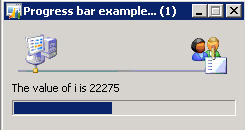
Below is the output:
Use progress control on the form

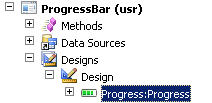
Create a new progress control and change the autodeclaration property of the progress control to yes as shown in the figure.
 
In the init() or run() method of the form modify the code as shown below.


SysDictClass        dictClass;

int                           i;

int                           classCount;

classId                   classId;

Dictionary            dictionary;

;

super();

dictionary = new Dictionary();

classCount = dictionary.classCnt();

progress.rangeLo(1);

progress.rangeHi(classCount);

progress.pos(1);

progress.step(1);


for (i=1; i <= classCount; i++)

{

progress.pos(i);

dictClass = new SysDictClass(dictionary.classCnt2Id(i));

info(dictClass.name());

}


Animation Control

we can use Animations to let the end users know that process is running at the back ground.
We can use Animate controls to show the progress. Create a new form and add a animate control as shown below. Change the autoDeclaration property of the animate control to Yes.

Override the run() method and paste the below code:


public void run()

{

int i;

#AviFiles

;

super();

for (i = 1 ; i <= 10000; i ++)

{

Animate.animateFile(#AviPrint);

Animate.play(); // autoplay(true);

}


Animate.visible(false);

}


Below is the output
 
Please note: Progress bars are inbuilt in runbase frameworks


Thanking you and 
Have a nice day!!


Get selected records on the grid / datasource

This should also be a common task for Dynamics AX developers.
Fortunately, there's a little helper class in AX to make it easier for us, the MultiSelectionHelper.
For example, if you want to get a set of selected records in a grid, you could use it like this:

MyTableBuffer              myTableBuffer;
MultiSelectionHelper      selectionHelper   = MultiSelectionHelper::construct();
Set                             selectedRecords  = new Set(Types::Record);

selectionHelper.parmDataSource(myTableBuffer_DS);

myTableBuffer = selectionHelper.getFirst();

while (myTableBuffer)
{
    selectedRecords.add(myTableBuffer);
     myTableBuffer = selectionHelper.getNext();

The code above should be very useful when getting the list of selected records directly on the form.
Another simplest way is
dataset.Columnname;
Eg.:
     MainAccount_ds is a dataset then  write like MainAccount.MainAccountId;
to get current selected row on the grid's Account Number.

if you want to get the selected records in a class that was called from a form, for example, you could use the MultiSelectionHelper like this:

public static void main(Args _args)
{   
    FormDataSource          formDataSource;   
    MyTableBuffer           myTableBuffer;
    FormRun                 caller = _args.caller();
    MultiSelectionHelper    helper = MultiSelectionHelper::createFromCaller(caller);
    Counter                 i;
    // First we need to get the correct form data source
    for (i = 1; i <= caller.dataSourceCount(); i++)
    {
        formDataSource = caller.dataSource(i);
         if (formDataSource.table() == tableNum(MyTableBuffer))
        {
            break;
        }
    }
    // We then tell the selection helper object to create ranges for the selected records
    helper.createQueryRanges(formDataSource.queryBuildDataSource(), fieldStr(MyTableBuffer, RecId));
    // Now we can traverse the selected records
    myTableBuffer = helper.getFirst();
     while (myTableBuffer)
    {
        info(myTableBuffer.RecId);
         myTableBuffer= helper.getNext();
    }
}

Tuesday, July 21, 2015

Dynamics Ax 2012 / Ax 2009: How to get SID


Go to Command prompt and then enter the command whoami /user

Thanking you,
Have a nice day!!!

Thursday, February 12, 2015

SSRS Report: Arabic Numbers and Hijri Date

Hi,
Please find some SSRS Reports properties where showing how to set a number field to Arabic numbers.
Select a number field and the Localization properties.
See the above image to set it.
To Show a Gregorian date in Hijri Date, please set the Localization property as below.
Thanking you 
Have a Nice Day!!!
Regards,
Mr. 221

Monday, February 9, 2015

SQL Server: Check online users of a database and kill the current sessions.

Scenario: Sometime restore/detach database you will get a message that the database cannot use exclusively because currently there are some users who using the database.

Find all the current users of your SQL Server.

SELECT login_name, COUNT(session_id) AS [session_count] 
FROM  sys.dm_exec_sessions
GROUP BY login_name
ORDER BY login_name


Then kill the current sessions.


USE master;
GO
ALTER DATABASE <your db Name>
SET SINGLE_USER
WITH ROLLBACK IMMEDIATE;
ALTER DATABASE <your db Name>
SET MULTI_USER;

GO

Then try to continue your work as usual.


Have a nice day!!!

Mr. 221

Sunday, February 8, 2015

AX 2012 R3 Error Message: Cannot create a record in Balance (CustVendTempOpenTrans). Amount 0,00. The Record already exists.

Problem:
Please see the message as given below:


This issue comes when you try to settle a customer/vendor.
Reason:

One record (may be payment/Invoice) already marked for settlement.
how to find it.

Solution: 


Try to override this error and find the record which is marked for settlement.

Step. 1:

AOT > Classes > CustVendOpenTransBalancesManager

Method Name: add

Make all comment and add new lines. see as following:


then find the marked transaction. It is happening because of error in updation of transaction.

Step.2:

Now go to

AOT > Tables > SpecTrans

Find the the record there.

Delete it and you can continue.

This issue will not come later.


Wish you all the best.

Have a nice day!!!